

Enhance your Trading Experience with TradingView
Enhance your Trading Experience with TradingView


Sign up to BitMEX and connect your account to TradingView for a fully integrated trading experience. Execute trades manually using TradingView’s advanced interface, and customize your strategy through Alerts and Pine Script™. Access seamless watchlists, real-time alerts, and live news all while using industry-leading charting, analytics, and execution tools in one place. Trade smarter and more efficiently with BitMEX.

Enhance your trading with TradingView

Next-Level Charting
Unlock TradingView’s advanced charting interface with over 20 customisable chart types, 110+ professional-grade drawing tools, and a fully interactive design tailored for serious traders.

Advanced Market Insights
Filter and analyze crypto markets directly from your charts with a powerful asset screener that combines technical indicators and key market data.

Backtest with Confidence
Fine-tune your strategies with historical data simulations. Identify patterns, optimise risk management, and refine execution before taking trades live.

Build & Customize with Pine Script™
Develop your own trading indicators and strategies using Pine Script™, a lightweight yet powerful language designed for traders looking to improve and personalize their technical analysis.

Execute Trades with Precision
Manage your trades effortlessly with TradingView’s interactive order system. Use drag-and-drop controls or advanced order panels to streamline execution and get access to BitMEX’s liquidity and multilingual customer support.

Join a Global Trading Community
Engage with millions of traders on TradingView, exchange ideas, and sharpen your skills through shared insights and market discussions.
How to connect
to TradingView
Navigate to Products, then click on Supercharts on TradingView
Go to the Trading Panel at the bottom of your chart
Select BitMEX from the list of available broker
Click Connect on the popup and enter your BitMEX email, password, and 2FA to sign in
Add BitMEX to Favorites
Navigate to Products, then click on Supercharts on TradingView
TradingView
app
Elevate your trading with the TradingView desktop experience.
Expand your workspace with a clutter-free layout for deeper market analysis
Sync seamlessly with the browser version for a smooth, uninterrupted workflow.
Organize and monitor multiple charts across different screens with ease.
Link tabs to track the same symbols across various timeframes and strategies.
Enjoy faster performance and enhanced stability for a pro-level trading setup.
Optimised for serious traders. Gain precision, speed, and full control over your trades with TradingView. Customise your setup, analyse the markets with advanced tools, and manage trades efficiently with a seamless desktop experience.





TradingView
app
Frequently Asked Questions
What Are the Advantages of Trading Through TradingView?

- Get Access to Powerful Charting Tools: TradingViews industry leading tools will allow you to leverage in-depth technical analysis to make more informed trades.
- Trade Directly from Charts: You can now place and manage orders natively from TradingView allowing you to customise charts without needing to leave TradingView.
- Discover Opportunities with Crypto Screening: You can filter and search for assets based on key metrics and indicators directly within your TradingView charts and trade natively in app.
- Benefit from Global Trading Community & Insights: Connect, share insights, and enhance your trading skills with TradingViews rich ecosystem.
- Use Real-Time Alerts to Never Miss Trades: Get notified instantly via push, email, or SMS. you can also set up Webhooks to pick up on signals and use them for automation.
- Backtest and Refine Strategies: Use Pine Script™ & historical data to optimise your trading strategies and signals.
How Do I Connect My BitMEX Account to TradingView?
- Navigate to Products > Supercharts on TradingView
 2. Go to the Trading Panel at the bottom of your chart
 3. Select BitMEX from the list of available brokers
4. Click Connect on the popup and enter your BitMEX email, password, and 2FA to sign in
3. Select BitMEX from the list of available brokers
4. Click Connect on the popup and enter your BitMEX email, password, and 2FA to sign in


Once you’re signed in, you should be redirected back to your TradingView account where you will be able to see your open positions, transaction history, and wallet balance on BitMEX. You can now also trade on BitMEX from TradingView directly.
Can I Test Trading Before I Get Started?
Yes, TradingView offers a Paper Trading feature that allows you to simulate real market conditions without risking actual money.
How to Set Up Paper Trading
- On the TradingView platform, click on the Trading Panel at the bottom of the chart
- Select Paper Trading and click Connect
Can I Deposit or Withdraw through TradingView?
Unfortunately, you cannot deposit or withdraw from BitMEX using your TradingView account. Deposits and withdrawals must be managed through your BitMEX account directly.
For guidance on how to deposit or withdraw, you can follow the official BitMEX support guides below:
How Do I Place Trades Through TradingView?
- Connect your BitMEX account to your TradingView Account using How Do I Connect My BitMEX Account to TradingView? article
- In the top-left search bar, select BitMEX as the exchange and choose the product you want to trade
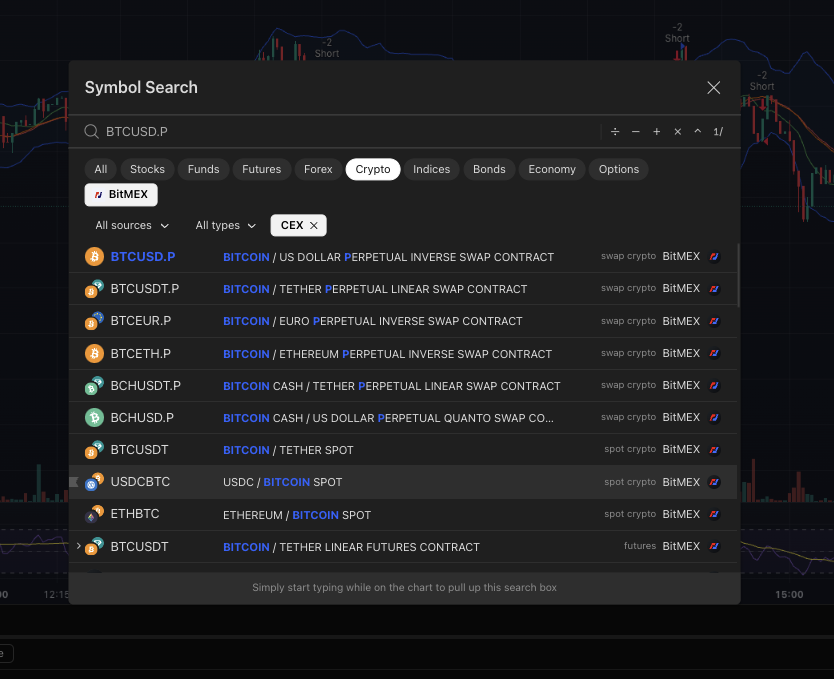
- Choose your order type (market, limit, etc.) size, and other parameters
 4. Click Buy or Sell to execute the order
Once you’ve done that, your trade will be placed on BitMEX, and you can monitor it on the chart.
What is Pine Script™ & How Can I Use It to Create a Signal?
Pine Script is a programming language for creating custom indicators, strategies, and alerts on TradingView. It allows you to automate trading signals, analyze data, and visualize custom calculations directly on charts.
How to Use Pine Script
-
Open TradingView and Select Your Trading Pair
-
Create and Apply Your Script
- Open the Pine Editor at the bottom of the chart
- Write or paste your Pine Script code (e.g., a custom indicator or strategy)
- Click Save to save your script, then click Add to Chart to apply it to the chart
-
Set Up an Alert Based on Your Script
- Click on the Alert button in the top toolbar
- In the Condition dropdown, select the custom script you just applied
- Choose the appropriate AlertCondition from the script (e.g., buy or sell signals)
- Customize the alert settings (e.g., frequency and notification method) and click Create


